4 Split the Manuscript by Section and Insert Numbers Automatically
Now for the paper itself. If you write everything in one long main.qmd, scrolling becomes painful and it is hard to see what is where. So we split it into one file per section.
4.1 Layout of the manuscript folder
manuscript/jcsm/
├─ main.qmd                   YAML, number loading and section order only (no body text)
├─ sections/
│   ├─ _00_title.qmd          title page (authors, affiliations, word count)
│   ├─ _01_abstract.qmd
│   ├─ _02_introduction.qmd
│   ├─ _03_methods.qmd
│   ├─ _04_results.qmd
│   ├─ _05_discussion.qmd
│   ├─ _06_declarations.qmd   acknowledgements, conflicts of interest, ethics
│   └─ _07_figure_legends.qmd
├─ reference-manuscript.docx  Word styles (Times 10 pt, line numbers, page numbers)
├─ vancouver-brackets.csl     citation style [1], [1-3]
└─ review/                    docx files returned by co-authors (Chapter 5)
Splitting by section means:
- You can open the section you want immediately, and git diffs are easier to read section by section
- Writing in a second language is easier to manage. You can keep a draft in your native language, e.g.
_02_introduction.ja.qmd, next to the English file and translate side by side - When you resubmit to another journal after a rejection, the section files can be reused as they are
4.2 main.qmd is just a table of contents
manuscript/jcsm/main.qmd
---
title: "Physical activity and sarcopenia in community-dwelling older adults: a cross-sectional study"
author: ""     # authors go on the title page (sections/_00_title.qmd)
date: ""
bibliography: ../../references.bib          # Paperpile export target (project root)
csl: vancouver-brackets.csl                 # citations as [1], [1-3]
link-citations: false
format:
  # html is for previews with \qp / \qi (one section only). docx is for submission
  html:
    toc: true
  docx:
    reference-doc: reference-manuscript.docx   # Times 10 pt, page numbers, line numbers
    number-sections: false
    toc: false
execute:
  echo: false
  message: false
  warning: false
---
After the YAML, write only the number loading (setup) and the order of sections.
manuscript/jcsm/main.qmd (continued)
```{r}
#| label: setup
library(targets)

# Stop if a citation key is missing from the bib
source(here::here("scripts/checks/check_citations.R"))
check_citations(here::here("manuscript/jcsm"), here::here("references.bib"))

# Guard against forgetting tar_make() (rendering with stale numbers)
stale <- tar_outdated(callr_function = NULL)
if (length(stale)) {
  stop("targets が古い: ", paste(stale, collapse = ", "),
       "\n→ 先に Rscript -e 'targets::tar_make()'", call. = FALSE)
}

# Numbers in the text are referenced as num$xxx
num <- tar_read(numbers)
```

{{< include sections/_00_title.qmd >}}

{{< pagebreak >}}

{{< include sections/_01_abstract.qmd >}}

{{< pagebreak >}}

{{< include sections/_02_introduction.qmd >}}

{{< include sections/_03_methods.qmd >}}

{{< include sections/_04_results.qmd >}}

{{< include sections/_05_discussion.qmd >}}

{{< include sections/_06_declarations.qmd >}}

# References

::: {#refs}
:::

{{< include sections/_07_figure_legends.qmd >}}
(The stop() message in the sample is in Japanese: “targets are stale: … → run tar_make() first”. Feel free to translate it in your copy.)
4.2.1 What is {{< include >}}?
{{< include file >}} is a Quarto feature (a shortcode) that pastes the contents of the file at that position before rendering. R code and inline `r ...` are executed after pasting, so section files can use num, created in the setup chunk of main.qmd.
4.2.2 Why the file names start with _
In a Quarto project, files starting with _ are never rendered on their own. Running quarto render on the whole project does not turn each section file into its own docx; they are used only through main.qmd.
4.2.3 {{< pagebreak >}}
Inserts a page break in Word and PDF. Use it between the title page, the abstract and the main text.
4.3 Write numbers in the text as num$xxx
In section files, instead of writing numbers directly, you write the name of the computed result.
sections/_01_abstract.qmd (excerpt)
**Results:** Of the `r num$n_all` participants (`r num$pct_women` women;
mean age `r num$age_mean` years), `r num$n_sarc` (`r num$prev_all`) had sarcopenia
(men `r num$prev_men`, women `r num$prev_women`). ...
Compared with low physical activity, high physical activity was associated with
lower odds of sarcopenia (adjusted `r num$or_long_high`), whereas moderate
physical activity was not (`r num$or_long_moderate`).
Rendered, it becomes:
Results: Of the 600 participants (56.3% women; mean age 77.8 ± 7.3 years), 127 (21.2%) had sarcopenia (men 15.3%, women 25.7%). … Compared with low physical activity, high physical activity was associated with lower odds of sarcopenia (adjusted odds ratio 0.34, 95% confidence interval 0.16–0.68, P = 0.003), whereas moderate physical activity was not (odds ratio 0.80, 95% confidence interval 0.47–1.35, P = 0.397).
4.3.1 Turn numbers into “ready-to-paste strings” in numbers.R
The contents of num$xxx are created by make_numbers() in scripts/04_analysis/numbers.R. The key is to make them strings already formatted down to the number of decimals and the “95% CI” wording. No computation or formatting logic lives on the text side, so the section files can focus entirely on prose.
scripts/04_analysis/numbers.R (excerpt)
fmt_p <- function(p) if (p < 0.001) "P < 0.001" else sprintf("P = %.3f", p)
fmt_pct <- function(x) sprintf("%.1f%%", mean(x) * 100)

# For the abstract (no abbreviations)
fmt_or_long <- function(r) {
  sprintf("odds ratio %.2f, 95%% confidence interval %.2f–%.2f, %s",
          r$estimate, r$conf.low, r$conf.high, fmt_p(r$p.value))
}
# For the main text (abbreviated)
fmt_or_short <- function(r) {
  sprintf("OR %.2f, 95%% CI %.2f–%.2f, %s", r$estimate, r$conf.low, r$conf.high, fmt_p(r$p.value))
}

make_numbers <- function(cohort, model) {
  or_tab <- broom::tidy(model, conf.int = TRUE, exponentiate = TRUE)
  or <- \(term) or_tab[or_tab$term == term, ]
  is_sarc <- \(d) d$sarcopenia == "Sarcopenia"

  out <- list(
    n_all = nrow(cohort),
    n_sarc = sum(is_sarc(cohort)),
    prev_all = fmt_pct(is_sarc(cohort)),
    pct_women = fmt_pct(cohort$sex == "Women"),
    or_long_high = fmt_or_long(or("physical_activityHigh")),
    or_short_high = fmt_or_short(or("physical_activityHigh")),
    # ... (about 20 in total)
  )
  lapply(out, as.character)   # all strings, for comparison with the JSON snapshot
}
Here is what tar_read(numbers) contains:
List of 6
 $ n_all     : chr "600"
 $ n_sarc    : chr "127"
 $ prev_all  : chr "21.2%"
 $ prev_men  : chr "15.3%"
 $ prev_women: chr "25.7%"
$ pct_women : chr "56.3%"num$
If you keep short names such as n_all or pct as bare variables, they can clash with other variables or functions and cause bugs that are hard to notice. With num$, you can tell at a glance that “this is a number for the text”, and nothing clashes.
4.3.2 Separate versions for the abstract and the main text
JCSM asks authors not to use abbreviations in the abstract. So for the same odds ratio we prepare two versions:
- For the abstract,
num$or_long_high… “odds ratio 0.34, 95% confidence interval 0.16–0.68, P = 0.003” - For the main text,
num$or_short_high… “OR 0.34, 95% CI 0.16–0.68, P = 0.003”
4.4 Tables and figures for submission
JCSM requires tables and figures to be uploaded as files separate from the main text. They are written to output/submission/ by the table_files and figure_files targets in _targets.R.
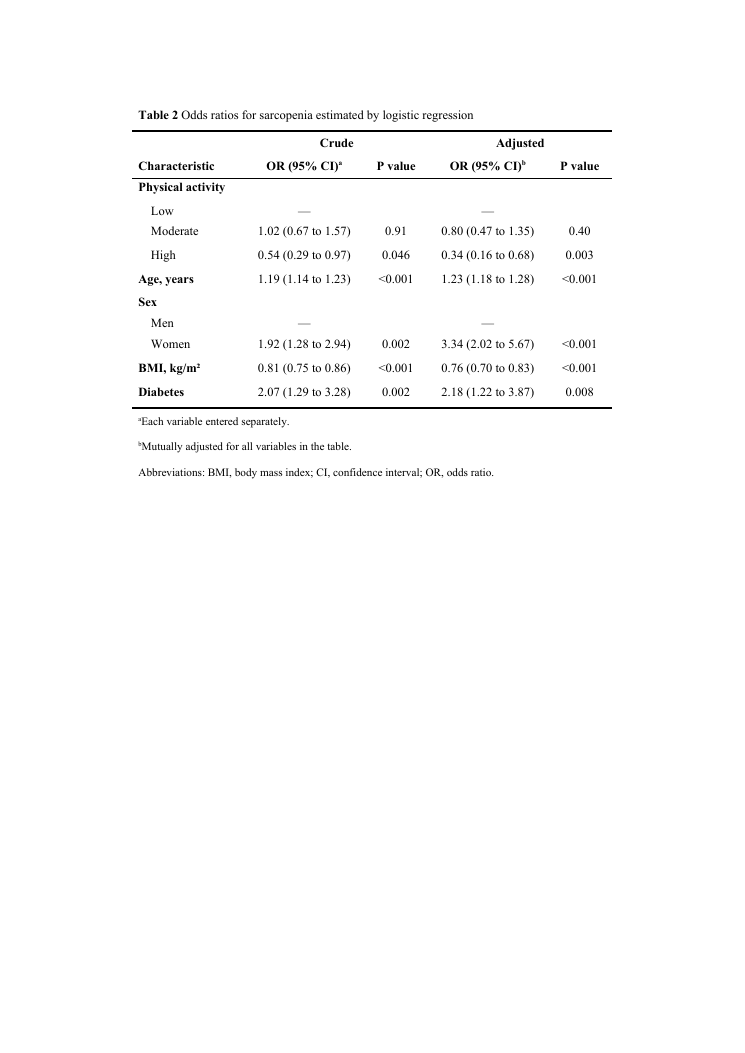
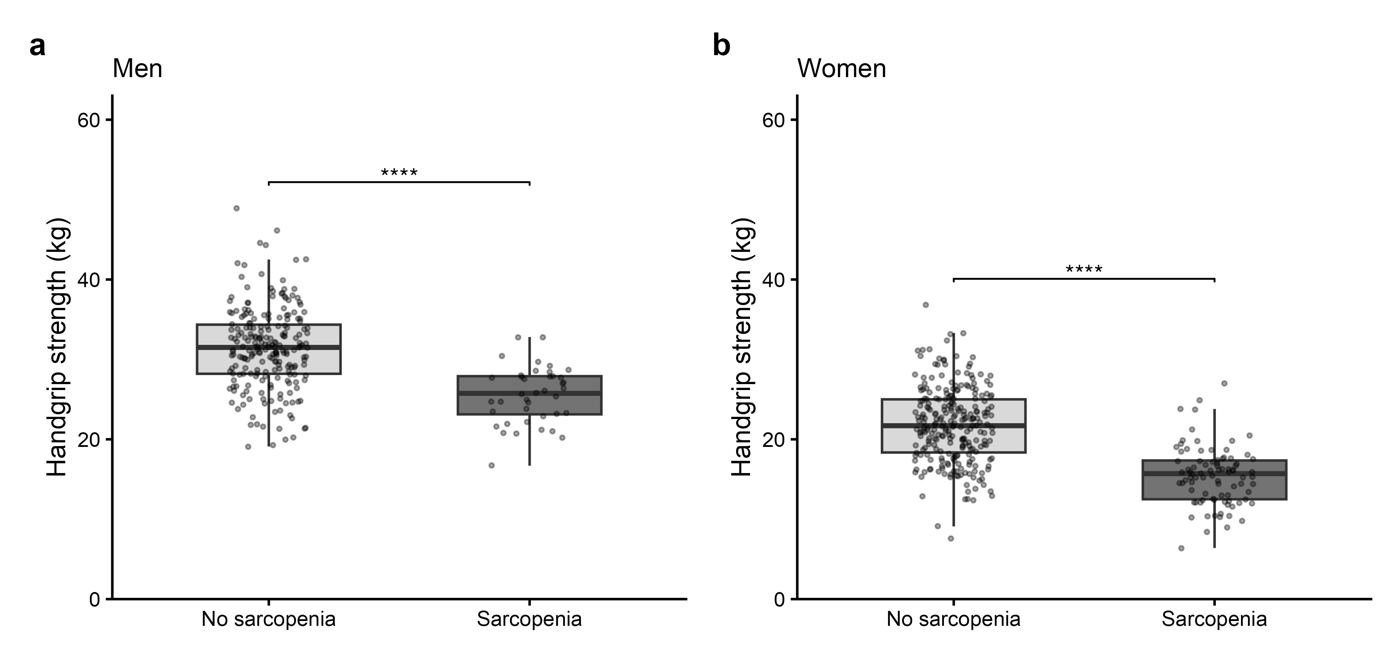
- Tables: built with
gtsummaryand converted to Word withflextable. Footnote markers are replaced with superscript a, b to match the journal’s rules - Figures: Arial 9 pt text, no title inside the figure, distinguished by shape and line type as well as colour, TIFF at 600 dpi plus EPS
The figure legends are written at the end of the main text file (_07_figure_legends.qmd).
4.5 Citation check
References are cited by key, like [@chen2020awgs]. If that key is missing from the references.bib exported from Paperpile or similar, Quarto only prints a warning and the text shows ?chen2020awgs.
To prevent this, the setup chunk of main.qmd runs check_citations(). If any key is missing from the bib, the render stops right there.
! references.bib にない引用キー: chen2020awgsX
→ Paperpile で書き出し直す / キーの綴りを確認
(In English: “citation key not in references.bib: chen2020awgsX → re-export from Paperpile / check the spelling of the key”.)
scripts/checks/check_citations.R (gist)
check_citations <- function(dir = "manuscript/jcsm", bib = "references.bib") {
  files <- c(file.path(dir, "main.qmd"), Sys.glob(file.path(dir, "sections", "*.qmd")))
  txt <- unlist(lapply(files, readLines, warn = FALSE))
  # Pick up @key (excluding \@ in e-mails and R's x@slot). @fig- @tbl- etc. are cross-references, so excluded
  hits <- regmatches(txt, gregexpr("(?<![\\w\\\\])@[A-Za-z0-9_][A-Za-z0-9_:.\\-]*", txt, perl = TRUE))
  keys <- unique(sub("[.:]+$", "", sub("^@", "", unlist(hits))))
  keys <- keys[!grepl("^(fig|tbl|sec|eq|lst)-", keys)]
  # Compare with the keys in the .bib and stop() if any are missing
  ...
}
It can also be run on its own:
Rscript scripts/checks/check_citations.R
#> 引用チェック OK: 7 件(bib 7 件中) (= "citation check OK: 7 keys, of 7 in the bib")Paperpile can automatically export your library as a BibTeX file to Google Drive, and has a setting for the citation key format. If keys change midway, citations break, so fix the key format and set the export target to references.bib in the project root (the location of these settings depends on the Paperpile version, so check its help pages).
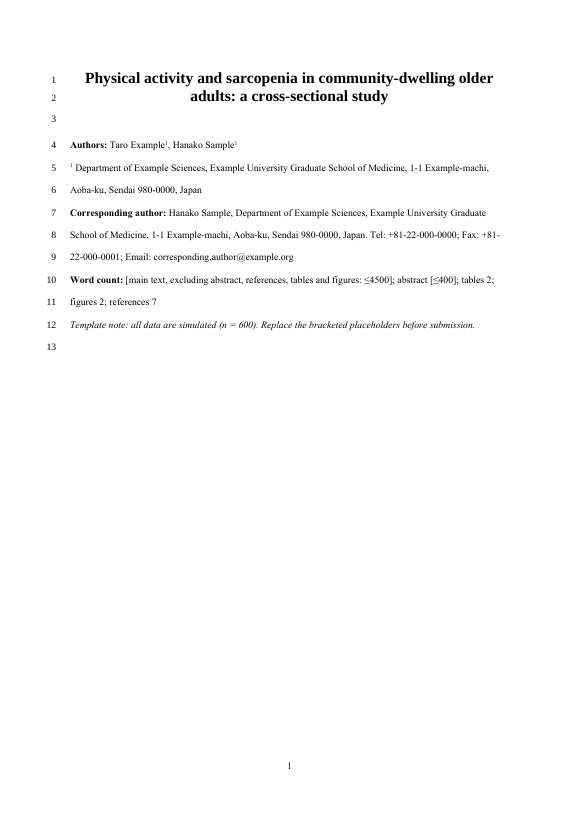
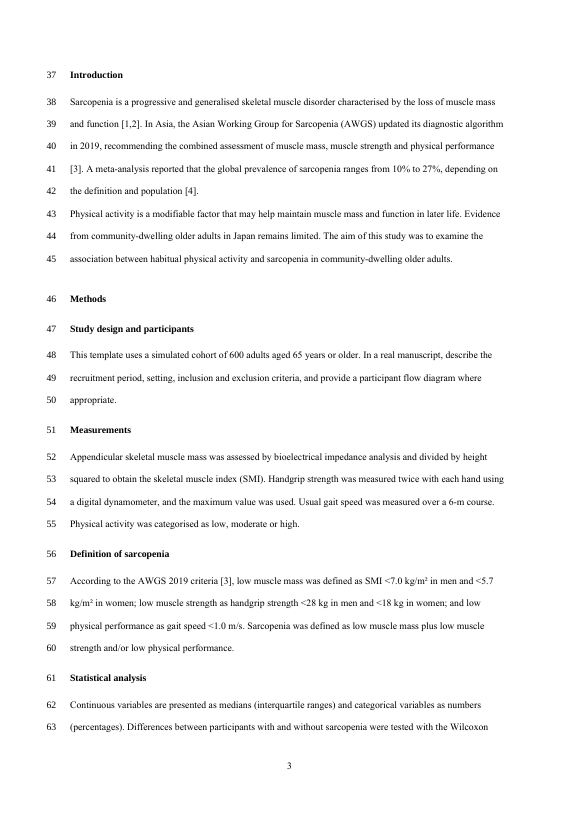
4.6 Render
quarto render manuscript/jcsm/main.qmd --to docx引用チェック OK: 7 件(bib 7 件中)
Output created: ../../output/manuscript/jcsm/main.docxNo computation happens, so it finishes in about a second.
4.7 Writing tip: use placeholders for numbers at first
When you have just started the first draft, going back and forth (add a line to numbers.R, run tar_make(), keep writing…) is tedious.
- At first, write numbers as placeholders such as
[OR]or[n] - Once results settle, add them to
numbers.Rin one go and replace the placeholders withnum$xxx
This way you never lose your writing flow.
4.8 Writing in English as a non-native speaker
Splitting by section makes it easier to think in your native language first and then write in English.
- In
sections/_02_introduction.ja.qmd, write the claim of each paragraph in one sentence in your own language (the skeleton) - Attach references to the skeleton
- Write the English in
_02_introduction.qmdwith the same paragraph structure (translate only once, at the end)
.ja.qmd files are not included from main.qmd, so they never end up in the manuscript.
4.9 Summary
- main.qmd holds only the YAML, the setup chunk and the section order. The body lives in
sections/_xx.qmd - Write numbers as
num$xxx; formatting is done innumbers.R - At the start of each render, check citation keys and the state of targets, and stop if anything is wrong
- Tables and figures are written as separate files by targets